Notifications
See every alert your machines have triggered, how many are critical, warnings or recovered, and filter them by machine, recipient or read status.
Notifications, in the left-hand menu, is the history of the alerts your machines have triggered. The alerts themselves, and who receives them, are set up in Settings → Alerts. The bell in the top bar shows only the latest ones.
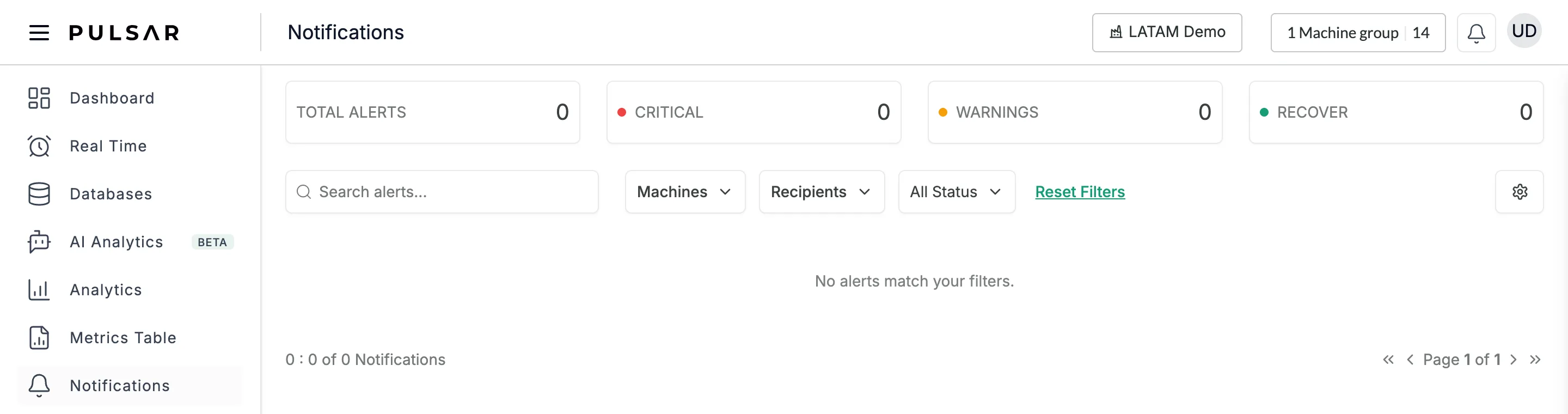
Counters
The four counters at the top count the notifications in the list:
- TOTAL ALERTS: all of them
- CRITICAL, with a red dot
- WARNINGS, with an orange dot
- RECOVER, with a green dot
Find a notification
- Search alerts... searches the list by text.
- Machines shows only the machines you tick. It has a search box and Select All; click Apply, or Clear.
- Recipients filters by the people the alerts were sent to.
- All Status chooses All Status, Read or Unread under Alert Status; click Apply.
- Reset Filters clears them all.
When nothing matches, the list shows No alerts match your filters. The count below the list, such as 0 : 0 of 0 Notifications, shows how many there are, with page arrows at the right.
Change the alerts
The gear button at the right opens Set Alerts in Settings → Alerts, where you create and edit alerts and their recipients. See Alerts.